menuescolar.es - School Menus Manager (2025)
Multi-tenant SaaS platform to manage school meal calendars with AI and display them on a personalized webapp for each school.
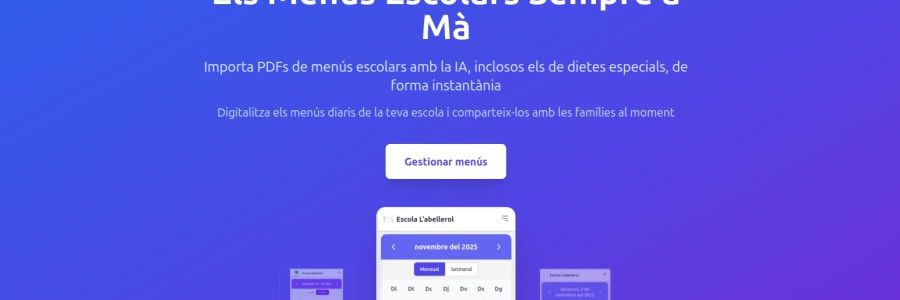
menuescolar.es - School Menus Manager (2025)
A SaaS platform to transform school menu PDFs into accessible digital calendars
The Project
menuescolar.es is a web application that solves a real problem: many schools publish monthly menus in PDF format, which makes quick consultation difficult for families.
The solution: a platform where each school can have its own public page with today's menu always visible and updated.
The process is simple: the school uploads a PDF of the monthly menu, Artificial Intelligence (Google Gemini) automatically extracts the meals for each day, and in seconds it's published in web format accessible from any device.
How It Works
For Schools (Managers)
- Registration → Account and organization creation with unique URL (example:
menuescolar.es/escola-abellerol) - Configuration → Customization with logo, description, and language preferences
- PDF Upload → Upload monthly calendar in PDF format
- AI Processing → Google Gemini analyzes the document and extracts structured meals
- Publication → Menus become automatically available at the public URL
- Share → Send the link to families and school staff
For Families (Visitors)
- Direct access → Visit the school's URL (no registration needed)
- Visualization → Check today's menu or browse the monthly calendar
- Multi-device → Works perfectly on mobile, tablet, and desktop
- Multi-language → Available in Catalan, Spanish, English, Basque, and Galician
Technical Architecture
Multi-Tenant System
Each school has its data completely isolated:
- A database with strict organization → meals relationships
- A single owner-user per organization (1:1 model)
- Automatically generated unique URLs (slugs)
- Logos and customized settings for each center
Security and Performance
Authentication and Authorization:
- JWT tokens managed by PocketBase
- Ownership validation in every modification operation
- AI API keys kept on server (never exposed to client)
- Security headers with Helmet (CSP, X-Frame-Options, etc.)
Abuse Protection:
- Rate limiting: 10 general requests every 15 minutes
- PDF rate limiting: maximum 5 uploads per hour
- CORS configured with allowed origins
- Format and file size validation
Optimizations:
- Multi-stage build with Docker (lightweight image)
- Static cache with Vite hash (1 year)
- TypeScript compilation for error detection at development time
- Lazy loading of React components
AI Processing
The brain of the system is Google Gemini:
- The PDF is converted to Base64 for secure transport
- It's sent to Gemini with a specific prompt to extract menus
- The AI returns structured data (date + meal)
- Data is validated and saved to the database
- Immediately available on the public web
Challenges Overcome
🤖 Extraction Accuracy
School menu PDFs come in very varied formats (tables, free text, images). Gemini has proven flexible enough to adapt to different layouts and correctly extract the data.
🏢 Multi-Tenant Isolation
Ensuring that each school only sees and modifies its own data required:
- Strict foreign key relations in PocketBase
- Ownership validation middleware in each endpoint
- Exhaustive unauthorized access tests
📧 Email System
Integration with Resend to send:
- Welcome emails
- Account verification
- New menu notifications (future)
🌍 Internationalization
Support for 5 languages with a 94KB translation file covering:
- Complete interface (buttons, messages, errors)
- Date formats adapted to each language
- Configuration per user and per organization
🐳 Docker Deployment
Multi-stage Dockerfile that:
- Stage 1: Compiles React frontend with Vite
- Stage 2: Copies build and prepares Node.js backend
- Result: A single image serving static frontend + API
Compatible with Dokploy for automated deployments from GitHub.
Tech Stack
Frontend
- React 18 with TypeScript
- Vite (ultra-fast build tool)
- React Router 7 (client-side routing)
- Tailwind CSS (utility-first styling)
- PocketBase SDK (authentication client)
- pdfjs-dist (PDF preview)
Backend
- Node.js 22 & Express
- PocketBase (SQLite database + auth)
- Google Gemini API (AI extraction)
- Resend (transactional email service)
- Multer (file upload management)
- Helmet (security headers)
- Rate Limit (anti-abuse protection)
Infrastructure
- Docker (containerization)
- Dokploy (automated deployment)
- GitHub (version control)
- PocketBase (separate hosting for auth and data)
Main Features
For School Managers
- ✅ Registration and organization creation with unique URL
- ✅ Upload monthly menu PDFs
- ✅ Automatic menu extraction with AI
- ✅ Customization with logo and description
- ✅ Default language configuration
- ✅ Mandatory email validation
- ✅ Complete menu management (editing, deletion)
- ✅ Private dashboard with statistics
For Families
- ✅ Public access without registration
- ✅ Today's menu highlighted view
- ✅ Browseable monthly calendar
- ✅ Responsive design (mobile, tablet, desktop)
- ✅ Language switch (5 languages available)
- ✅ Fast and optimized loading
- ✅ Shareable friendly URLs
System Features
- ✅ Multi-tenant with data isolation
- ✅ One organization per user
- ✅ Auto-generated unique slugs
- ✅ Template system (modern/classic/colorful)
- ✅ Duplicate menu detection (date + organization)
- ✅ PDF format validation
- ✅ Error handling with clear messages
- ✅ Server logs for debugging
- ✅ Health check endpoint for monitoring
Roadmap and Future Improvements
Planned Features
- 🔄 Multiple menus per organization: Standard menu, celiac, vegetarian, etc.
- 🔄 Collaborators: Allow multiple users per school
- 🔄 Email notifications: Automatic alerts for new menus
- 🔄 Custom domains: schoolmenu.escolapios.cat
- 🔄 Public API: Integration with other school systems
- 🔄 Mobile app: Native versions for iOS and Android
- 🔄 Export: Download menus in different formats
- 🔄 Analytics: Usage statistics and views
Technical Improvements
- 🔄 Automated tests: Coverage with Jest and React Testing Library
- 🔄 CI/CD pipeline: GitHub Actions for tests and deployment
- 🔄 Monitoring: Integration with Sentry for error tracking
- 🔄 Performance: Lighthouse score 90+ in all categories
- 🔄 SEO: Dynamic meta tags for each organization
- 🔄 PWA: Offline capabilities with Service Workers
Technical Documentation
The project includes comprehensive documentation:
- README.md - Quick start guide and local setup
- DEPLOYMENT.md - Production deployment with Dokploy
- MULTI_TENANT_SETUP.md - Multi-tenant schema configuration
- POCKETBASE_SETUP.md - PocketBase installation and initialization
- PDF_UPLOAD_IMPLEMENTATION.md - PDF processing details
- TESTING_CHECKLIST.md - Testing scenarios and edge cases
Project Status
Current status: ✅ 95% complete and ready for testing
Implemented
- ✅ Functional multi-tenant architecture
- ✅ Authentication and authorization system
- ✅ Complete organization CRUD
- ✅ PDF upload and AI processing
- ✅ Public interface for organizations
- ✅ 5-language internationalization
- ✅ Automated Docker deployment
- ✅ Transactional email system
- ✅ Rate limiting and security
- ✅ Complete documentation
In Polish
- 🔧 Header branding
- 🔧 Component route refinement
- 🔧 Performance optimization
Try the platform: https://menuescolar.es
GitHub: Private code (available upon request)
Launch date: November 2025
Developed by Albert Sarlé
Technologies
Achievements
- AI-powered menu extraction from PDFs
- Multi-tenant architecture with data isolation
- 5 languages support (CA, ES, EN, EU, GL)
- Secure JWT authentication system
- Automated deployment with Docker